adjuTOR
Pester assistant for service,
training and maintenance.
 
Does this sound familiar to you?
You urgently need on-site support to solve an unforeseeable error on your packaging line. Your colleague is not available to provide the relevant advises.

How about a software tool with line intelligence to support you during
maintenance, service, and training?
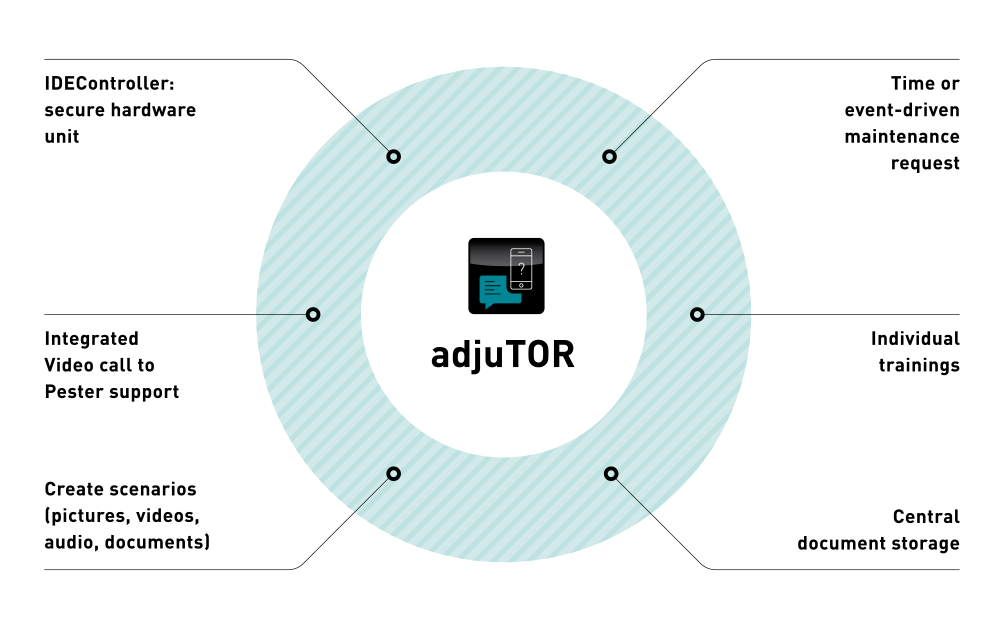
adjuTOR, your digital assistant allows you to generate own visual scenarios (pictures, videos, documents, audio) for maintenance, service and training suitable for machines or production lines. You can easily access the created scenarios via the application or by the linked QR Code for each scenario using your mobile device. It allows you to move freely along your packaging line and to connect with external support, e.g. your service supplier via live stream.

The adjuTOR assistant facilitates the onboarding of your new colleagues and reduces your downtimes in the event of errors.
Are you ready to learn more about adjuTOR?
  • You can optimize your maintenance performance cycles by time- or condition-based notifications to secure availability of your packaging line.
  • Benefit from a central unit for document storage, so all information is in one place, with mobile accessibility from everywhere.
  • As stand-alone solution not interfering with the machine operations, no re-validation procedures are required.
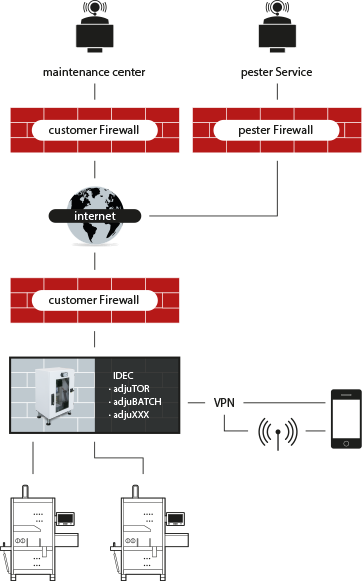
  • Rely on highest safety: adjuTOR application is part of the IDEC architecture, running on a Linux based, firewall protected operating system.
  • You get additional help from Pester or other suppliers through remote support via live stream, by using the integrated video call.
What do you need?
  • IDEController, the Infinity Device Edge Controller, a machine independent hardware unit hosting adjuTOR application.
  • WLAN / LAN connection and web-browser access to your adjuTOR application.
  • Readiness for OPC UA connections from your machines to Pester IDEController.
  • Creativity while producing your customized and flexible scenarios.
Your secure connection
  • With your mobile devices you connect via WLAN / LAN in viewer mode, avoiding any security-related conflicts using a safe VPN tunnel.
  • External support: additional help via data connection to e.g., pester pac automation or other maintenance centers is available using your internet connection. This connection is secured by your (customer) firewall and additional external services‘ automation firewalls.